
















How to Track Child's Phone Without Them Knowing (Free & Paid)

Want to track child’s phone without breaking the bank? You can do it for free using built-in tools like Google Family Link for Android or Apple Find My for iOS. These options provide real-time location tracking, app usage monitoring, and screen time limits—all without monthly fees.
Many parents already monitor their children, and most older kids have a smartphone, so digital supervision is part of family life. This guide covers everything from free built-in options to trial apps like Hoverwatch and Qustodio, plus GPS smartwatches for younger children.
How Does Phone Monitoring Work to Track Child’s Phone?
Phone monitoring uses GPS, Wi-Fi, and cellular data to track child’s phone location and activity in real time. The software runs in the background and sends the data to an online dashboard. Apps offered on Google Play must show a persistent notification and their own icon. Parents access collected data through a secure online dashboard.
Setup requires physical access to your child’s device. After installation, apps collect call logs, texts, app usage, and browsing history. GPS accuracy outdoors is usually good and improves with Wi-Fi indoors. On Android, deeper access still depends on permissions that the person turns on in the phone’s settings, for example Accessibility; Android 13 and later may restrict some of them until you allow them.
What Are the Free Built-in Methods to Track Child’s Phone?
Google Family Link offers free Android monitoring through your Google account. Get real-time location tracking, app approvals, and screen time management.
School Time mode limits apps during school hours.
What Apps Offer Free Trials to Track Child’s Phone Activity?
-
 Hoverwatch 3-day trial
Monitoring app for Android. Tracks GPS, calls, SMS, and social apps on a phone you own or are authorized to monitor, with the device user informed. $29.95/month or $99.95/year.
-
 Qustodio 3-day trial
GPS tracking, web filtering, and time limits. Free plan covers one device permanently. SMS monitoring requires paid upgrade ($4.58/month).
-
 Bark 7-day trial
AI-powered scanning of 30+ apps including Instagram, TikTok, and Snapchat. Detects cyberbullying and predatory behavior. $14/month after trial.
-
 Norton Family 30-day trial
Website blocking and YouTube monitoring across multiple devices.
How Do I Install and Use Hoverwatch to Track Child’s Phone?

Sign up at hoverwatch.com for a 3-day free trial. Download the APK to your child’s Android phone (requires a few minutes of physical access). Works on Android 7.0+.
During setup Android asks you to turn on Accessibility Service and Notifications access; on Android 13 and later you may also need to allow restricted settings. Follow the steps in Hoverwatch’s Android install guide.
All tracked data appears in your online dashboard within minutes. Access from any browser or smartphone for real-time updates.
Works on Android phones and tablets only (no iOS support). Continues working even if SIM card is removed.
What Physical Trackers Can I Use to Track Child’s Phone-Free?
-
 Jiobit $130 + $15.95/month
Compact device clips to clothing or backpacks. GPS, Wi-Fi, and Bluetooth tracking. 10-day battery life.
-
 AngelSense $99 + $39.99/month
Keychain-style tracker for special needs children. Includes voice monitoring and two-way communication.
-
 TickTalk 5 $189-229 + $9.99/month optional
Smartwatch with GPS, calls, video, and messaging. Parents control all contacts. Designed for ages 5-12.
-
 COSMO JrTrack 3 100-150 + $9.99/month
Affordable kids smartwatch offering GPS tracking, voice/video calls, and family-safe messaging with IP68 water resistance and long battery life.
- Fitbit Ace LTE $229 + subscription
Fitness-focused smartwatch for kids combining activity tracking with GPS location monitoring and 4G LTE connectivity for safe communication.
How Do These Solutions Compare for Tracking Child’s Phone?
| Solution | Free/Trial | Features | Cost | Compatibility |
|---|---|---|---|---|
| Google Family Link | Free | GPS, app limits | $0 | Android |
| Apple Find My | Free | GPS, device sharing | $0 | iOS |
| Qustodio | 3-day trial | GPS, SMS (paid), web filters | $4.58/month | Android/iOS |
| Bark | 7-day trial | Social scanning (30+ apps) | $14/month | Android/iOS |
| Hoverwatch | 3-day trial | GPS, SMS, social apps | $29.95/month | Android only |
| Jiobit | No trial | GPS only | $130 + $15.95/month | Wearable |
| TickTalk 5 | No trial | GPS, calls, video | $189-229 + $9.99/month | Wearable |
Free options lack advanced social media monitoring. Hoverwatch covers SMS and social apps, which the free tools do not. Physical trackers work without phones.
What Are the Pros and Cons of Each Solution?
Hoverwatch: Stealth Monitoring to Track Child’s Phone on Android
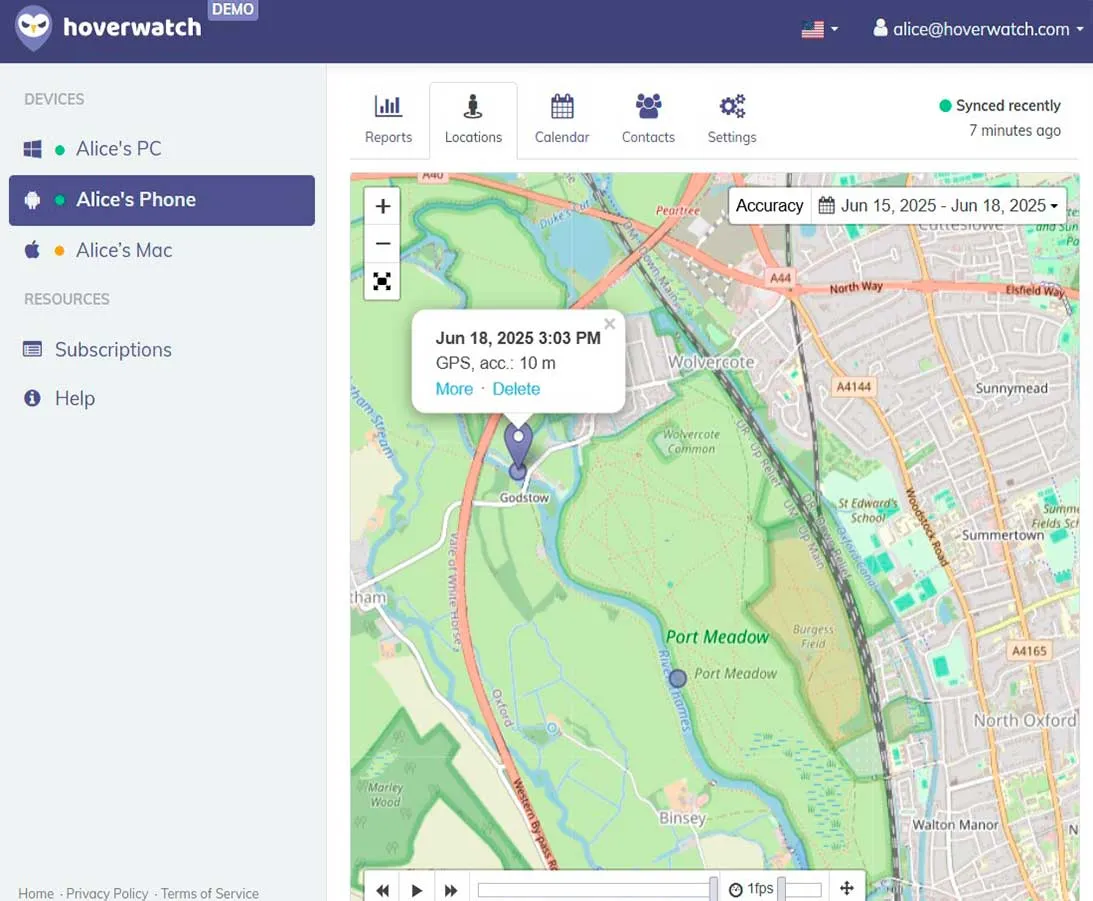 Hoverwatch is a monitoring app for Android phones. It logs calls, SMS, locations and social apps on a phone you own or are authorized to monitor, with the device user informed.
What is Hoverwatch?
A mobile tracking app that logs SMS, calls, locations, and social media (WhatsApp, Facebook, Snapchat, Instagram, Telegram, TikTok).
Works on Android phones you own or are authorized to monitor, with the device user informed.
Key Features and Limitations
| Feature | Capabilities | Limitations |
|---|---|---|
| Call/SMS Tracking | Logs calls with audio recording; captures texts including MMS | Audio recording depends on device model |
| Social Monitoring | Tracks 20+ apps including WhatsApp, Facebook, Snapchat, TikTok | Requires device-level access |
| Location Tracking | GPS via Wi-Fi/cellular triangulation; real-time maps and history | Accuracy varies by signal strength |
| Keylogger/Camera | Captures keystrokes; photos via front camera when unlocked | On Android, keystroke capture needs the Accessibility Service permission, which you turn on during setup; Android 13 and later may restrict it until you allow it. |
| Dashboard | Secure online access; supports up to 25 devices | No iOS device support |
Compatibility: Android 7.0+ (phones and tablets). No iOS support.
- Logs calls, SMS and social apps in one dashboard
- Comprehensive logs for 20+ social/messaging apps
- 3-day free trial with full functionality
- Continues tracking if SIM card removed
- Android-only for phones (no iPhone)
- No content blocking or screen time controls
- $29.95/month or $99.95/year ($8.33/month annually)
Best for: Parents with Android-using children needing comprehensive monitoring. Consider Bark for iOS compatibility.
Google Family Link: Free Foundation to Track Child’s Phone

Google Family Link offers free digital management tools for Android families. Perfect for basic supervision without monthly costs, though advanced needs may require paid supplements.
What is Google Family Link? Google’s free parental control app for Android or ChromeOS devices. Parents link accounts to manage screen time, track location, and filter content. Designed for children under 13, with features extending to teens.
Key Features and Limitations
| Feature | Capabilities | Limitations |
|---|---|---|
| App Management | Approve/block downloads; set app time limits | Can’t block pre-installed apps |
| Screen Time | Daily limits, bedtime schedules, School Time mode | Controls expire at age 13 |
| Content Filtering | Blocks explicit sites in Chrome; SafeSearch | Limited to Google ecosystem |
| Location Tracking | Real-time maps; arrival/departure alerts | No advanced geofencing |
| Account Security | Remote lock, password reset | No call/text monitoring |
Compatibility: Android 7.0+, ChromeOS 71+. iOS supports basic features only.
- Completely free with no subscriptions
- Seamless Android integration
- School Time mode reduces distractions
- No social media or text monitoring
- Limited iOS support
- Controls expire at age 13
Best for: Android families with young children (under 13) needing basics. Consider Qustodio or Bark for advanced features.
Apple Find My: Built-in iOS Location Sharing

Apple Find My provides seamless location sharing for iOS families through Apple’s privacy-focused ecosystem. Completely free but lacks broader activity monitoring.
What is Apple Find My?
Integrated iOS tool for sharing device locations among family members. Part of Family Sharing with real-time maps and alerts. Focuses on safety without deep oversight.
Key Features and Limitations
| Feature | Capabilities | Limitations |
|---|---|---|
| Location Tracking | Real-time maps with family sharing | Requires consent; no activity logs |
| Device Sharing | Integrates with AirTags | GPS only; no app monitoring |
| Alerts | Arrival/departure notifications | Privacy concerns with data sharing |
| Security | Precision finding on newer devices | No call/text controls; iOS-only |
Compatibility: iOS 12+. Works with iPhone, iPad, Apple Watch, AirTags. No Android support.
- Completely free and reliable
- Precise location mapping
- AirTag integration
- Built into iOS
- GPS-only focus
- Requires user consent
- No content filtering or screen time
Best for: Apple families wanting simple location sharing. Consider Bark or Hoverwatch for full activity monitoring.
Qustodio: Advanced Multi-Platform Protection

Qustodio delivers customizable parental controls across multiple platforms. Combines robust web filtering with flexible screen time management, though premium features increase costs.
What is Qustodio?
Premium app offering web filtering, time limits, and activity monitoring across unlimited devices (paid plans). Creates safe online experiences with detailed reporting.
Key Features and Limitations
| Feature | Capabilities | Limitations |
|---|---|---|
| Web Filtering | Blocks 30+ categories; AI-powered alerts | Tech-savvy kids can bypass with VPNs |
| Screen Time | Custom schedules; panic button (Android) | SMS monitoring requires paid upgrade |
| App Management | Blocks apps; sets time limits per app | Less control on iOS |
| Location Tracking | Real-time GPS with geofencing | Indoor accuracy issues |
| Activity Monitoring | Call/text logs; social media scanning | No full social message access |
Compatibility: Android, iOS, Chromebook, Kindle, Windows, Mac. Unlimited devices on Complete plan ($8.33/month).
- True multi-platform support
- Detailed weekly reports
- Panic button for emergencies
- 3-day free trial + free plan
- Premium plans $4.58-8.33/month
- Visible to children
- VPN bypass risks
- Must pay yearly (no monthly option)
Best for: Families managing multiple devices across platforms. Consider Bark for social media focus.
Bark: AI-Driven Risk Detection and Alerts

Bark emphasizes AI-powered alerts for online risks rather than constant surveillance. Scans 30+ platforms for concerning content while respecting teen privacy.
What is Bark?
Monitoring app using AI to detect cyberbullying, predators, depression indicators, and inappropriate content. Covers texts, social media, and emails across 30+ platforms.
Key Features and Limitations
| Feature | Capabilities | Limitations |
|---|---|---|
| Social Scanning | Monitors 30+ apps; AI detects risks | Battery drain during scanning |
| Alert System | Proactive notifications with severity ratings | GPS not in basic plan |
| Activity Monitoring | Scans texts, emails, social messages | No full message access |
| Content Controls | Web filtering; app blocking | Less robust than Qustodio |
Compatibility: Android, iOS. Unlimited devices. Also offers Bark Phone and Bark Home.
- Scans 30+ platforms
- AI detects cyberbullying, depression
- Expert guidance on flagged issues
- 7-day free trial
- Battery drain issues
- Limited GPS (premium only)
- $14/month cost
- No money-back guarantee
Best for: Families prioritizing social media safety over full surveillance. For full activity monitoring on Android, consider Hoverwatch.
Jiobit: Compact Wearable GPS Tracker
Jiobit offers durable GPS tracking without requiring a smartphone. Attachable design clips onto clothing or backpacks for discreet monitoring.
What is Jiobit?
Compact GPS tracker using Wi-Fi, Bluetooth, and cellular signals for precise indoor/outdoor location. Designed for young children, special needs kids, and pets.
Key Features
| Feature | Capabilities | Limitations |
|---|---|---|
| Location | GPS, Wi-Fi, Bluetooth precision; geofencing | $15.95/month subscription required |
| Battery | Up to 10 days per charge | GPS-only; no calls/messages |
| Design | Compact, water-resistant, clips to anything | ~$130 upfront cost |
Compatibility: iOS/Android app. Attaches to any clothing or accessory—no phone needed for child.
- Durable, water-resistant
- Precise indoor/outdoor tracking
- No phone required for child
- 10-day battery
- $15.95/month subscription
- GPS-only (no communication)
- $130 upfront cost
Best for: Young children (3-8) or special needs kids not ready for smartphones. Consider AngelSense for voice monitoring.
TickTalk 5: Smartwatch with GPS and Communication
TickTalk 5 combines GPS tracking with two-way communication in a kid-friendly smartwatch. Includes calls, video, and messaging with strict parental controls.
What is TickTalk 5?
4G LTE kids smartwatch with real-time GPS, voice/video calls, and secure messaging. No full internet or social media. Designed for ages 5-12.
Key Features
| Feature | Capabilities | Limitations |
|---|---|---|
| Communication | Voice/video calls, texts with approved contacts only | Occasional setup difficulties |
| Location | Real-time GPS with geofencing | GPS inaccuracy in dense areas |
| Activity | Fitness tracker with step counter | Battery varies with video use |
Compatibility: Wearable smartwatch pairing with iOS/Android apps. Works independently with 4G LTE.
- GPS tracking + calls/texts
- Full parental control over contacts
- SOS emergency button
- No social media access
- Occasional GPS inaccuracies
- $9.99/month optional data plan
- Setup can be complicated
- $189-229 upfront cost
Best for: Elementary school children (5-12) needing communication + GPS. Consider COSMO JrTrack 3 for budget option.
How to Choose and Test a Solution to Track Child’s Phone?
-
 Choose based on device type.
Android users benefit from Hoverwatch's activity monitoring or Google Family Link's free controls. iOS families should start with Apple Find My for basic tracking or Bark for comprehensive social media scanning.
-
 Test with free trials first.
Install monitoring apps on a spare device to verify features work as advertised. Monitor for 1-3 days checking GPS accuracy and alert reliability.
-
 Compare the total annual cost.
Calculate total annual costs including subscriptions. Annual plans like Hoverwatch's $99.95/year save money versus monthly billing. Many parental control apps offer free trials, so you can test before you pay.
-
 Match features to concerns.
Choose Hoverwatch for SMS tracking, Bark for social media risks, or physical trackers for young children without phones. Start with free options like Google Family Link or Apple Find My, upgrading only when free tools prove insufficient.
Conclusion
You can track child’s phone through multiple free and paid methods. Built-in tools like Google Family Link and Apple Find My provide basic location tracking at no cost. Advanced apps like Hoverwatch offer comprehensive surveillance including SMS, calls, and social media tracking for deeper oversight.
Laws on monitoring differ by country and US state and by who owns the device. This is general information, not legal advice.
Laws vary by jurisdiction, especially in custody situations. Always verify local regulations and consider open communication about monitoring to build trust alongside safety.
The right solution depends on your child’s age, device type, and safety concerns. Young children benefit from physical GPS trackers like Jiobit or TickTalk 5 smartwatches. Teenagers with smartphones require sophisticated monitoring through apps like Bark for social media risks or Hoverwatch for complete activity tracking.
Try Hoverwatch today with a 3-day free trial for comprehensive Android monitoring. Visit hoverwatch.com to start tracking calls, SMS, GPS, and social media. Hoverwatch delivers the tracking and detailed insights parents need.
You May Also Like
 How-To & Guides
 How-To & Guides
 How-To & Guides
 How-To & Guides
 How-To & Guides
 How-To & Guides
Watch Out
A powered-off phone or Airplane Mode freezes location for every app. Even paid tools only show the last known spot until it reconnects.
Pro Tip
Family Link's GPS often stalls in Doze mode when the phone naps in a backpack. Add Google Maps location sharing as a backup feed.
Good to Know
Trial lengths reset per device, not per account. Test on the actual phone you'll monitor, since a spare may behave differently.
Pro Tip
Before installing, charge the phone and disable battery optimization for the app. Battery optimization is a common reason background tracking stops.
Good to Know
Wearables shine for under-8s who lose phones. Most need their own cellular plan or eSIM, so factor that monthly line into the upfront price.
Quick Fact
Free tools log location only. The gap that pushes parents to paid apps is almost always SMS and social messages, not GPS accuracy.
Watch Out
Visible apps like Qustodio can be bypassed with a VPN by tech-savvy teens. Whatever you choose, check your state's consent rules first and tell your child.
Pro Tip
Run a one-day dry run on yourself before trusting any app. Walk around, check the dashboard lag, and confirm alerts actually fire.
Watch Out
If a custody case or divorce is filed, the rules on monitoring can change. Ask a lawyer before you keep monitoring. This is general information, not legal advice.