


Is Hoverwatch Safe to Use? 5 Facts About Your Data, Phone and Money

Is Hoverwatch safe to use? The public breach records checked in November 2026 show no data breach involving it, but how it protects your data rests on the vendor’s own word. Setup asks you to turn off Play Protect scanning, and its own rules name three uses: your minor child’s phone, a company phone with written notice, or your own.
If you are reading Hoverwatch reviews before you buy, the real risk splits four ways: your privacy, the phone, your money and the law. Check 5 facts from the vendor’s documents, public reports and our own test, then run a six-point check before you install the software.
Safe in Which Sense? Four Questions Behind the Search

Several monitoring apps have leaked data from their customers and from the phones they ran on, so “safe” needs a precise meaning.
For the Hoverwatch app, “safe” can mean four different things:
-

Your data: what the app collects, such as calls, text messages, and location, and where that data goes.
-
The phone: what setup changes in the phone's own protection.
-

Your money: how the trial, the refund and renewal work.
-

The law: whose phone it may go on.
The app runs on Android phones; it does not support iPhone or iPad.
Hoverwatch Review Sources: Vendor Pages, Public Records and a Phone Test
This review is published on Hoverwatch’s own blog. The install test was run by our team on a Motorola moto g 5G (2022) with Android 13 in November 2026; the facts are checked against Hoverwatch’s dated pages and public records.
Each fact cites a vendor page, such as the privacy policy, terms or FAQ, with its printed date, if any. The public record is TechCrunch’s list of hacked monitoring-app companies, our news searches, and Citizen Lab’s 2019 study.
Judge a monitoring app by what you can check yourself: who holds the logs, how the account signs in, and how you end it. A vendor’s promise can open those questions; it does not close them.
Editorial persona: Gilbert McNamara is a project-approved fictional expert profile, not an independently verified real person. This guidance was written and fact-checked by the editorial team; it is not a verbatim interview quotation.

In our test, we signed up for the free trial, installed the app and signed in to the online account where its logs arrive.
Not in our test: a security audit, the vendor’s servers, or a paid subscription.
5 Facts About Hoverwatch Safety, Checked Against the Record
Confirmed means a dated vendor page or a named public record states it, or our test recorded it. Vendor’s claim means the vendor says it and no independent source was found. Not stated means no source read says it.
Fact 1: No Hoverwatch Data Breach Is on the Public Record
The fact: No report of a data breach involving the app was found in the public records checked in November 2026.
What the record shows: TechCrunch’s running list of monitoring-app companies hacked or leaking data, updated February 9, 2026, names 27 since 2017, and this app is not on it.
In one 2025 case, Catwatchful exposed the email addresses and passwords of more than 62,000 customers.
Our news searches found no breach report for the app. Citizen Lab’s study “The Predator in Your Pocket” (June 12, 2019) looked at eight monitoring apps, this one among them.
The vendor’s privacy policy, effective May 25, 2024, does not state how users are told of a breach.
Status: Confirmed: the records checked and the app’s place in the study. Not stated: the study’s findings and a breach notice.
What it means for you: A missing report is not a guarantee. In our view, no report on the record is a starting point, not a clean bill of health.
Fact 2: What “Encrypted” Covers, in the Vendor’s Own Words
The fact: The vendor says the data is encrypted and stored temporarily; its privacy policy lists who else may receive personal data.
What the record shows: The home-page FAQ says the logs go to a “secure cloud dashboard,” encrypted and stored temporarily, depending on your plan.
Another FAQ page says the encryption covers data in transmission and storage; no page read names the method, and no independent audit was found.
The privacy policy (effective May 25, 2024) lists who may receive personal data, including hosting providers, group companies, a buyer of the business, and authorities when the law requires it, but not which staff can open the logs.
Retention has two figures: the policy keeps a lapsed paid account’s data for 30 days, and the pricing page says logs are deleted 7 days after the period ends.
The terms (last modified May 19, 2024) exclude the vendor’s liability for lost or corrupted data and cap it at the greater of $10 or the amounts paid in the past three months.
In our test, sign-in was by login and password, with no two-factor option.
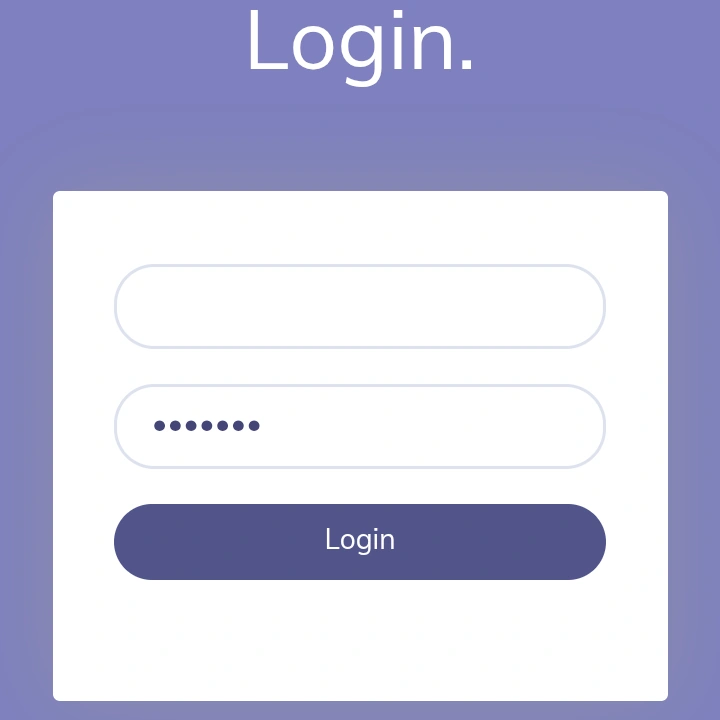
Status: Vendor’s claim: the encryption. Confirmed: the sharing list, retention and liability terms as printed, and the sign-in in our test. Not stated: the encryption method and staff access.
What it means for you: The vendor does not say which of its staff can read your logs, and its terms leave the risk of lost data with you.
Fact 3: Play Protect Can Remove the App, and Full Data Needs Accessibility Access
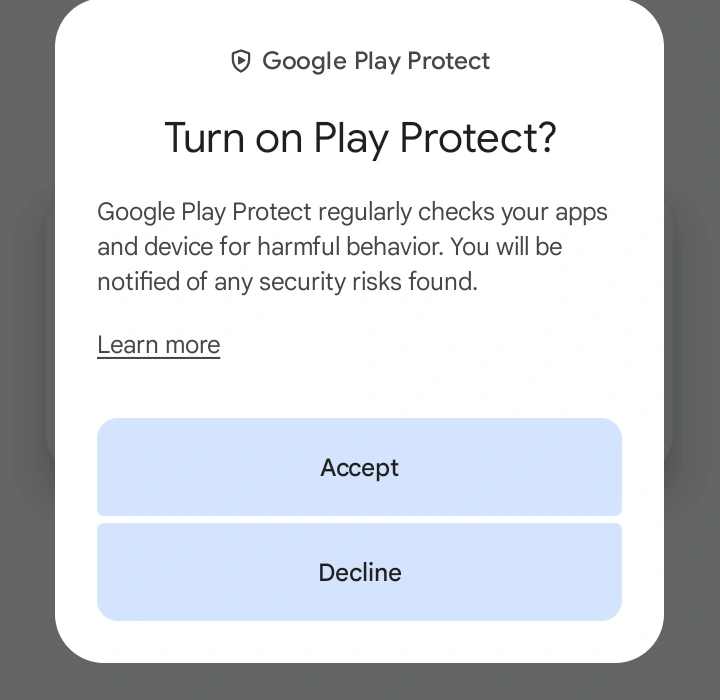
The fact: The vendor’s team says (November 2026) that Play Protect does not limit what the app collects but, with scanning on, may remove the app, and that without Accessibility Service the data is incomplete. We found no published page for the Play Protect part; the vendor’s help lists Accessibility “For call recording and social networking.”
What the record shows: The vendor’s FAQ says to download the app from its own site, and its guide has you allow “Install unknown apps.” The guide asks you to deactivate “Scan apps with Play Protect,” to stop Android “asking questions about the activity of the monitoring program.” Its employee-monitoring page says no root is needed.
Google’s help says Play Protect “may deactivate or remove harmful apps from your device,” and Google’s developer pages count apps that collect personal data without adequate notice or consent among those it flags.
In our test, the setup screen said “Accessibility service is required to provide extended monitoring functions.” The install was hard to follow for a non-specialist, and declining a step leaves some data missing; we accepted every offer.
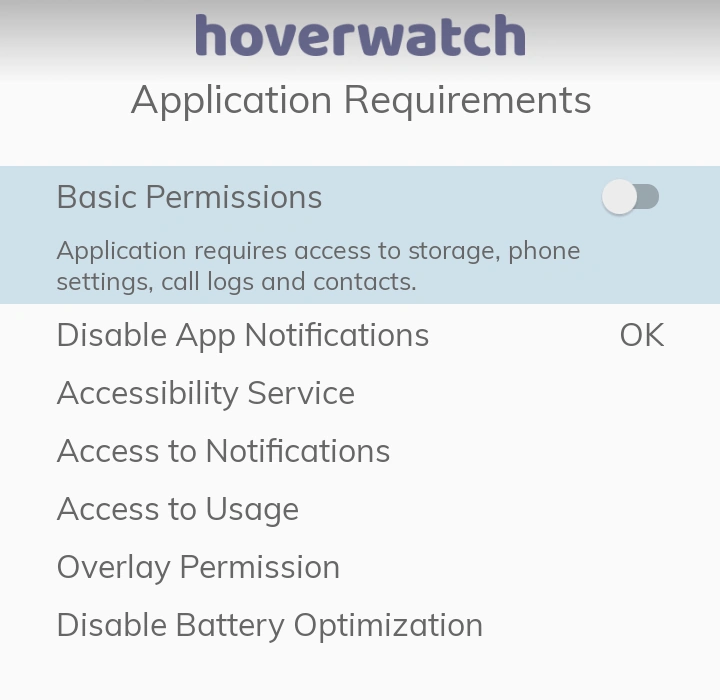
Setup in our test also offered to keep or hide the icon, and its screen said: “Android restricts hiding app icons. The app will appear on a device under the WiFi icon.” See where a trained eye finds the app.
Keep the icon and tell your child.
Status: Vendor’s claim: what both steps do, and no root. Confirmed: the guide’s steps, Google’s pages, and the install and icon line (our test). Not stated: whether today’s build is flagged.
What it means for you: With scanning off, other apps go unscanned too. Accessibility is broad: Google’s help says it lets an app “read content on your screen and interact with apps on your behalf.”
Fact 4: The 3-Day Trial Needs No Card; Payment Comes With a Subscription

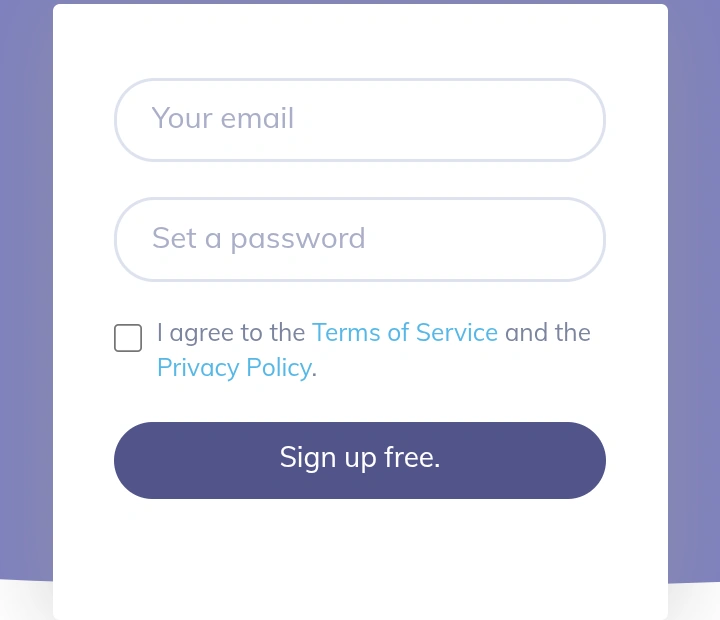
The fact: In our test (November 2026), the free sign-up asked for an email and a password, with no card field. A subscription needs a card, the vendor’s team says: the checkout page shows card fields, and the pricing page lists PayPal, WeChatPay, and Alipay. Our test did not reach that step.
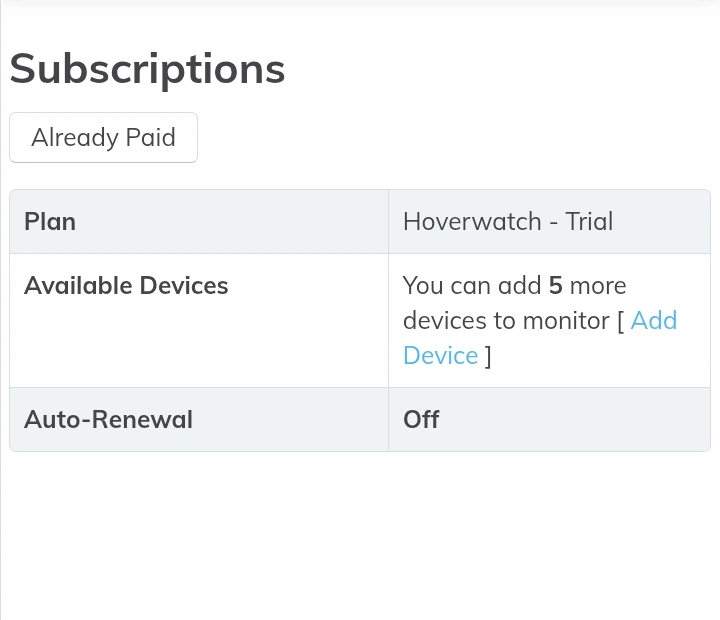
What the record shows: The account page showed the trial plan with “Auto-Renewal: Off,” which describes the trial, not a paid plan. The vendor lists a 3-day fully functional trial; its FAQ says a plan is chosen afterward, with pricing in the dashboard.
The pricing page (November 2026) lists the Personal plan for one device at $39.95 for 1 month, $69.95 for 3 months, and $119.95 for 12 months; a month is 30 days from billing.
A refund can be requested within 14 days of the first purchase, and the charge shows under a neutral descriptor, not the Hoverwatch name.
Whether a paid plan renews by itself is not stated on the pricing, terms, or refund pages, or in the checkout cart. The help center says to cancel by contacting support.
Status: Confirmed: the trial without a card (our test); the price, trial length, refund window, and FAQ as printed. Vendor’s claim: the card at subscription. Not stated: automatic renewal.
What it means for you: Note the purchase date for the 14-day refund window; check the renewal terms in your account.
Fact 5: Hoverwatch’s Rules Name Three Uses; Its FAQ Adds Consent
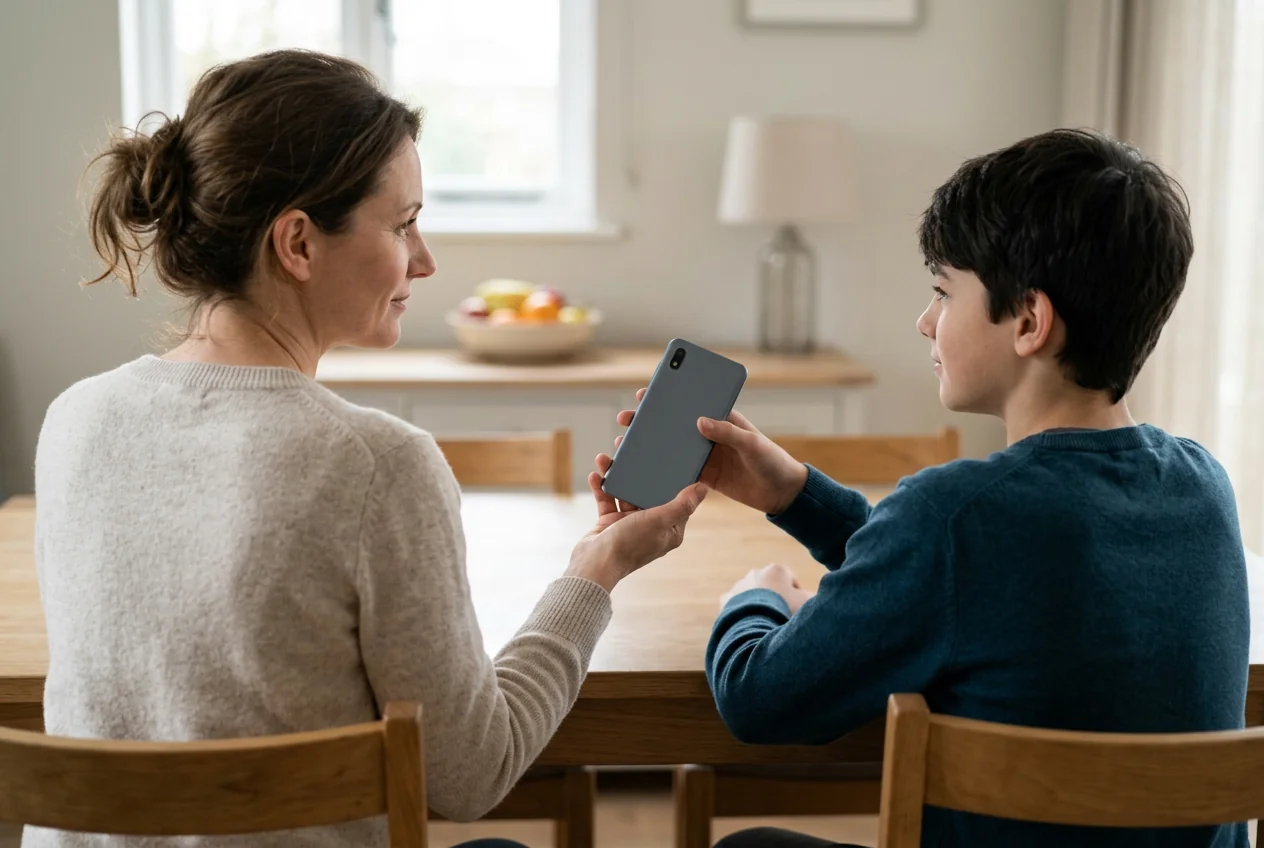
The fact: The vendor’s terms and Acceptable Use Policy name three uses: your own phone, your minor child’s, and a company-owned phone with written notice the employee acknowledged. Its FAQ calls use lawful with the user’s explicit consent, so the Acceptable Use Policy and the FAQ differ on another adult.
What the record shows: The Acceptable Use Policy (last modified June 8, 2026) rules out “a spouse, partner, ex-partner, or any other adult - even with their consent,” and requires telling the device user wherever the law requires it.
The FAQ says rules differ by region, most areas require informing the user, and the installer is responsible for authorization and notice.
The terms rule out monitoring an adult without their knowledge and consent. The federal Wiretap Act prohibits intentionally intercepting electronic communications, with stated exceptions. In 2021, the FTC banned SpyFone and its CEO from the surveillance business.
A rule on paper protects no one until the person holding the phone hears it. Tell the phone’s user what the app collects; with another adult, go no further without their knowledge and consent, and check local law first.
Editorial persona: Betty Mitchell is a project-approved fictional expert profile, not an independently verified real person. This guidance was written and fact-checked by the editorial team; it is not a verbatim interview quotation.

If such an app may be on your own phone, read what to check before removing an app someone close installed, then the link in Fact 3.
The vendor names a misuse contact; if you are in danger, call local emergency services.
Status: Confirmed for both vendor documents as printed, and for the statute and the FTC order.
What it means for you: Buying the app is not permission to install it on any phone; for another adult, check local laws first.
The 5 Facts at a Glance
Each row keeps its card’s status:
| Fact | Status | What it means for you |
|---|---|---|
| No data breach on the public record | Confirmed (November 2026 records); Not stated: Citizen Lab’s findings | A missing report is not a guarantee |
| What “encrypted” covers, in the vendor’s words | Vendor’s claim: encryption; Confirmed: the policy’s sharing list | The pages do not say which staff can read the logs |
| Play Protect can remove the app; full data needs Accessibility | Vendor’s claim: what each step does; Confirmed: the guide’s steps | Other apps go unscanned too |
| The 3-day trial needs no card; payment comes with a subscription | Confirmed in our test: no card for the trial; Not stated: renewal | Note the purchase date; check renewal |
| The rules name three uses; the FAQ adds consent | Confirmed: both vendor documents | Not without the user’s knowledge and consent; check local laws |
Before You Install: A 6-Point Safety Check
- Whose phone. Your minor child’s Android phone, a company-owned phone with written notice the employee acknowledged, or your own, as the terms say; not an iPhone. For another adult, not without their knowledge and consent, and check local laws.
- Where the file comes from. The vendor’s site, as its FAQ says; in our test, the account dashboard’s link led to the file-hosting site pixeldrain.com. Use the link from your own account, not a copy from another site.
- What setup changes. Setup asks you to turn on Accessibility access and turn off Play Protect scanning; Fact 3 gives what each step does. In our test, the steps were hard to follow. Decide first whether those changes suit the phone.
- The account. Sign-in had no two-factor option in our test (Fact 2), so use a unique password and report any use you did not make to the vendor at once, as its terms ask.
- The money. Note the purchase date, the charge descriptor, and the period’s end; look up renewal terms in your account before then, since the public pages do not state them.
- The end. If you did not set this app up yourself, read the line for the phone’s user in Fact 5 first. Save anything you still need before you delete it. Then use “Delete device” in the account, which deletes the program too, or uninstall from the program on the phone. In our test, the delete option covered the device “and all of its logs” and warned “This operation is irrevocable.”
Is Hoverwatch Legit? The Verdict by Situation

Legitimacy depends on the setup. A parent of a minor with an Android phone, or an employer with company-owned phones and written notice, is within the vendor’s rules; another adult’s phone without their knowledge and consent is not.
For a parent, the trade-offs are those of Facts 2 and 3: data protection rests on the vendor’s word, and Play Protect scanning goes off.
The setup to choose: a minor child’s Android phone, with the child told, the icon kept, and the billing dates noted. An iPhone is not an option.
FAQ: What People Ask About Monitoring App Safety
-
It is a trade-off, not a ranking. A third-party app adds a vendor account and servers that hold the logs, and for this app, a file from outside Google Play with Play Protect scanning off. Google Family Link and Apple's Screen Time are the platform makers' own controls, set up from the parent's device. The third-party app adds its own record of calls and texts.
-
For this app, the company keeps the logs in its online account, on servers its providers host, for as long as its two retention figures say; whether its staff can see them is not stated. The privacy policy also says personal data is shared worldwide.
-
A warning on its own does not settle it either way. The vendor's help pages describe such warnings about its app: one says Xiaomi's antivirus defines it as a dangerous application, another deals with Play Protect messages about monitoring programs. Check the source first: the vendor's site, by the link your own account gives.
-
For Hoverwatch, you can request a refund within 14 days of the first subscription purchase. The refund policy says requests are answered within 7 business days and the money goes back to the original payment method. It does not apply to an account suspended for breaking the terms, and it covers plans bought on the vendor's website.
-
Not without her knowledge and consent: no vendor document allows monitoring an adult that way, and intercepting another person's communications can break federal law. Even with her consent, the Acceptable Use Policy and the FAQ word it differently, so check local laws first. Talking with her, or with a couples counselor, can help where an app on her phone cannot.
All information here is provided for informational purposes only and is not legal advice.
You May Also Like
 Privacy & Security
 Privacy & Security
 Privacy & Security
 Privacy & Security
 Privacy & Security
 Privacy & Security
Four Meanings
Safe can mean your data, the phone, your money or the law. Decide which of the four you mean, then read the facts for it.
How We Checked
The facts rest on dated vendor pages, public records and one phone test. The test did not include a security audit or a paid plan.
Status Words
Each fact carries one status: Confirmed, Vendor's claim or Not stated. Read the status first, because it shows how far to trust the fact.
No Breach Report
A missing breach report is not a guarantee. It shows only what the records checked in November 2026 held; treat it as a starting point.
Encryption Claim
The vendor says the data is encrypted, but no page read names the method or says which of its staff can open your logs there.
Scanning Off
Turning off Play Protect scanning leaves other apps unscanned too, and Accessibility access lets an app read content on the screen.
Trial and Card
The free sign-up asked for no card in our test. Renewal of a paid plan is not stated, so check your account before it ends.
Whose Phone
The rules name three uses: your own phone, your minor child's, or a company phone with written notice. Another adult needs knowledge and consent.
Reading the Table
Read the status column first: it separates what the vendor says from what a dated page, a public record or our own test confirmed.
Before Installing
Six checks come before the install: whose phone, where the file comes from, what setup changes, the account, the money and the end.
By Situation
A parent of a minor and an employer with written notice are within the vendor's rules; another adult's phone without consent is not.