undetectable keylogger for windows

Stealth and undetectable keylogger

The software is hidden from the target device user: it is not visible in the task manager, and it cannot be seen among the installed applications in the “Start” menu

Hoverwatch stealth keylogger for Windows runs invisibly on Windows 10, 11 and earlier — hidden from Task Manager, the system tray and the Start menu. It captures keystrokes, passwords, periodic screenshots and browser history without the user knowing, uploading every log silently to your online dashboard for remote review.

  • check mark

    The Program is Invisible for Windows User

  • check mark

    It Cannot be Seen Among the Installed Applications in the “Start” Menu

  • check mark

    You Should Enable this Feature During Installation

  • Step 1

    Sign up to your free online account: enter email and a new password.

  • Step 2

    Download and install the best phone tracker app from online account.

  • Step 3

    Monitor all recorded data and recorded calls in your online account.

You must agree to Sign Up.

During software installation, you can choose its operation mode – whether it will be hidden from the users. There is an option of leaving it completely visible or making it into a stealth keylogger.
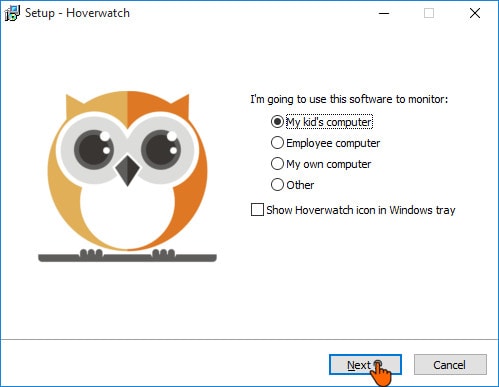
Stealth keylogger and undetectable keylogger

If you remove the tick in “Show Hoverwatch icon in Windows tray” then the software will operate in the hidden mode.

Attention! It’s impossible to choose the settings in the already installed software, so you need to reinstall it to do this.

Why is this feature useful to you?

Invisibility is an essential feature when you are trying to obtain accurate information without revealing yourself to the target device user. It’s not surprising that your children and employees may have a problem with you installing such software on their devices, which is why the stealth mode can save you from unnecessary quarrels.

Also, you should remember that when the users know that there is such software on the device they will inevitably change their activity, so it depends on which goal you want to achieve. If you want to be completely transparent, you can easily select a visible mode – the choice is all yours.

You may also be interested in

Free mobile tracker. Sign up free.