


A simple log of keystrokes when the device user opens Facebook is not enough, as it captures only a small percentage of all the activity that goes on inside Facebook.
This is the reason why we have created a special method for capturing all the activity that takes place while the device user is on Facebook and a few other social media websites. In response to every action taken while browsing Facebook, our software creates a screenshot of the page currently on screen. The screenshot is small and takes up very little space, but it lets you see what was viewed, who the conversation was with, and what the other person wrote back.
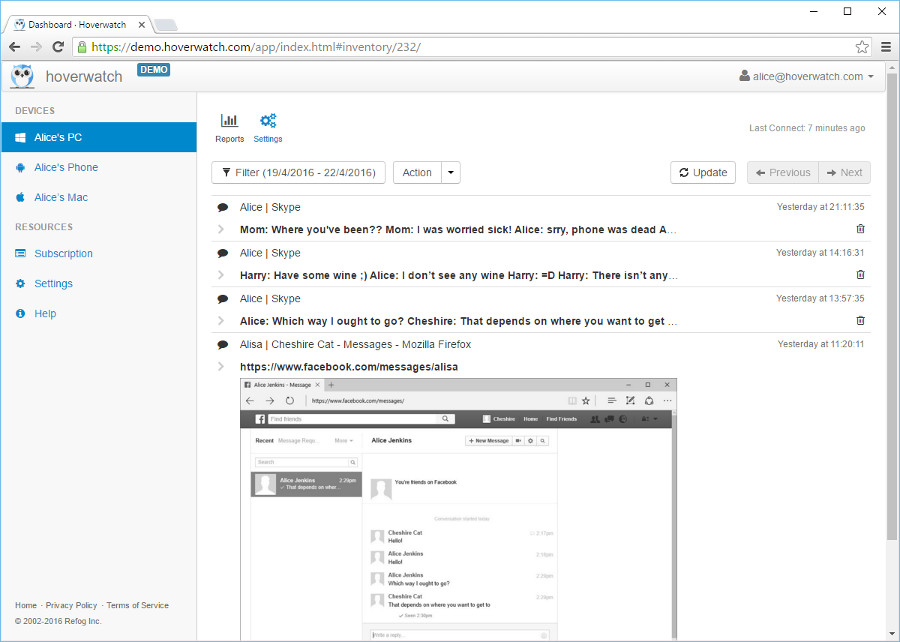 Facebook monitoring for Windows
This method lets you follow a discussion as a whole. The Facebook message capture function is off by default. If you wish to turn it on, you have to select the appropriate computer in your user panel, go to the Settings menu and check the “Chat Messages” box.
Why is this feature useful?
Nowadays, social media and their messaging systems are the primary method of communication among people, and especially the younger generation.
Monitoring social media activity on a device you own or are authorized to monitor helps you understand how your child or an employee is spending time online, so you can support their safety and keep a company device used appropriately under a disclosed policy.

