windows keyboard logger

Hoverwatch Keystroke Recorder Pro free download

The keystroke recorder function of the Hoverwatch software allows registering of all the pressed keyboard buttons and recording of all the texts typed using the device keyboard

Hoverwatch keystroke recorder is software that records every keystroke typed on the monitored Windows PC — standard apps, Metro-apps and console apps alike — preserving the text exactly as the user saw it. Full keyboard logs sync to your online dashboard alongside periodic screenshots, viewable from any device with Internet connection for a near-complete picture of computer activity.

  • check mark

    Keystroke Recorder Free Download

  • check mark

    Saves All Key Pressed

  • check mark

    All Logs Are Saved in Your Online Account

  • Step 1

    Sign up to your free online account: enter email and a new password.

  • Step 2

    Download and install the best phone tracker app from online account.

  • Step 3

    Monitor all recorded data and recorded calls in your online account.

You must agree to Sign Up.

The pressed keyboard buttons are recorded by the keystroke recorder pro in the standard apps, Metro-apps, and even console apps.
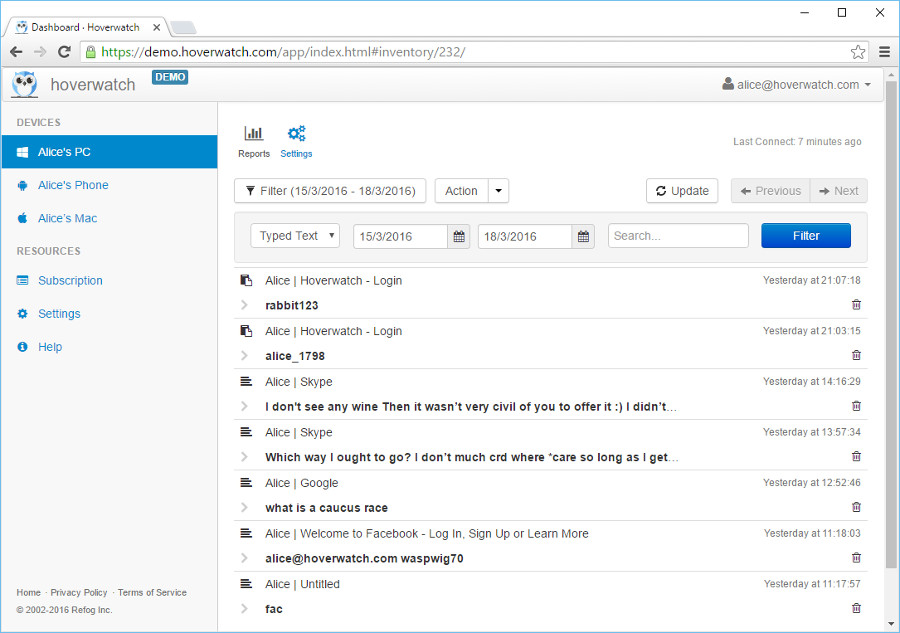
Keystroke recorder pro free download Keystroke recorder pro free download

During the recording of the typed texts the keystroke recorder software registers pressing of the service keys and saves the text in a way that it was viewed by the user.

Keystroke recorder function is enabled by default. There is no need to change any additional settings to make it work.

All the pressed keys and typed texts from the monitored computer are available online in the user panel and can be viewed from any device that has Internet connection.

Along with occasional taking and saving of screenshots, the keyboard logger allows you to view almost an entire picture of the computer activity.

Why is this feature useful?

Nowadays, text messages are among the most widespread and convenient means of communication.

In such a way, having an opportunity to use a keystroke recorder function is incredibly valuable if you need a clear picture of activity to protect your children or to manage company-owned devices under a disclosed monitoring policy, with the device user informed. With the help of this feature, you will know how often your child uses the device and for which purposes and whether there are any reasons to be concerned.

Hoverwatch keeps everything in check

Trusted by millions to monitor Android devices effortlessly

testimonial female avatar

I needed a way to track my kid’s app activity, and Hoverwatch’s keystroke recorder blew me away! It logs every keystroke perfectly, syncing smoothly to my account. Setup was a breeze, and it runs quietly in the background—ideal for any concerned parent who has talked to their kids about it.

Emma Taylor, Canada
testimonial male avatar

Hoverwatch is amazing for keeping an eye on my phone’s use. The real-time updates are spot-on, and it’s so lightweight it doesn’t slow the device. The interface is a dream to use—perfect for staying informed without hassle!

Liam Patel, India

Android Keyboard Tracker: FAQ on Keystroke Monitoring with Hoverwatch

What is an Android keyboard tracker and how does Hoverwatch implement it?

plus minus

An Android keyboard tracker is a specialized tool crafted to capture every single keystroke typed on a device, such as text messages, search queries, or login details. Hoverwatch implements this feature with precision, running efficiently in the background to collect all typed data comprehensively. Once installed, it gathers this information and uploads it to your secure online account, where you can access it anytime via a browser. This allows you to monitor everything from casual chats to critical inputs on a device you own or are authorized to monitor, with the device user informed.

How does the keystroke logging feature operate on Android devices?

plus minus

The keystroke logging feature on Hoverwatch operates by meticulously recording every key pressed on the Android device’s keyboard, whether it’s the default system keyboard or a third-party application downloaded from the app store. It captures these inputs instantly as they occur, ensuring nothing slips through unnoticed. The collected data is then securely synchronized to your Hoverwatch dashboard, where you can review it in real time or at your convenience. This process happens seamlessly, providing a continuous stream of information about what’s being typed, from casual notes to important communications, all without impacting device performance.

Can the typing tracker capture passwords or sensitive inputs?

plus minus

Yes, the typing tracker in Hoverwatch is designed to capture all keystrokes entered via the keyboard, including sensitive details like passwords, PINs, or personal notes, as long as they’re typed manually. This capability makes it a powerful tool for monitoring, but it comes with a responsibility to use it ethically. For instance, it’s perfect for overseeing your own device’s security or ensuring a child’s safety with their consent, giving you full visibility into what’s being entered. Always ensure compliance with local regulations when tracking such private information to avoid misuse.

How does the input logger run on the device?

plus minus

Hoverwatch’s input logger runs efficiently in the background so it doesn’t interrupt the device’s normal performance, and all collected data is reviewed from your secure online dashboard rather than on the device itself. Hoverwatch is intended for monitoring devices you own or are authorized to monitor — such as your minor child’s phone or a company-owned device — and we require you to inform the device user that monitoring is active, as many regions legally require notice.

Where can I see the keystrokes that have been logged?

plus minus

All keystrokes logged by Hoverwatch are conveniently accessible through your personal online dashboard, which you can log into from any web browser, whether on a computer, tablet, or another phone. The dashboard provides a detailed, chronological list of every recorded input, organized by date and time for easy navigation. This setup allows you to review the data whenever it suits you, offering a clear and comprehensive overview of everything typed on the device, from short messages to lengthy notes, all in one centralized location.

Does the keystroke recorder support all Android versions?

plus minus

The keystroke recorder in Hoverwatch is designed to support any current version of Android, ensuring broad compatibility across the latest devices and operating system updates. The development team keeps it optimized to work seamlessly with every modern Android release, adapting to new features and security patches as they roll out. This means whether you’re using a recent flagship phone or an older model still receiving updates, Hoverwatch will effectively capture and log keystrokes without compatibility issues, providing reliable performance across the Android ecosystem.

Can I monitor multiple devices with the typing tracker?

plus minus

Yes, with a premium Hoverwatch plan, you can extend the typing tracker to monitor multiple devices simultaneously, each linked to your single account for streamlined management. This is particularly useful if you need to oversee several phones or computers, such as those used by family members or employees. Each device’s keystroke data is kept distinct in your dashboard, clearly labeled and separated, so you can switch between them effortlessly and review their individual logs without confusion, enhancing your oversight capabilities.

How does the keystroke recorder manage various keyboard types or languages?

plus minus

Hoverwatch’s keystroke recorder is versatile enough to handle inputs from any keyboard app installed on the device, whether it’s the default Android keyboard, a custom third-party option, or one tailored for specific languages. It captures every keystroke regardless of the layout, language settings, or special characters used, ensuring thorough monitoring across diverse typing scenarios. This adaptability makes it effective for multilingual users or those switching between different keyboard styles, delivering consistent results no matter how the device is configured.

Can I search or filter the recorded keystrokes?

plus minus

Absolutely, Hoverwatch equips its dashboard with robust search and filter tools, allowing you to quickly pinpoint specific words, phrases, or patterns within the recorded keystroke logs. You can enter a keyword to locate its occurrences or apply filters based on timeframes or specific apps, making it easier to analyze the data efficiently. This feature saves time and enhances usability, especially when dealing with large volumes of typed information, ensuring you can focus on what matters most without sifting through everything manually.

How much device storage does the logging feature require?

plus minus

The logging feature in Hoverwatch is intentionally designed to be lightweight, minimizing its impact on the device’s storage capacity. It uses only a small amount of space to temporarily hold keystroke data before syncing it to the cloud, where it’s securely stored and managed. Once uploaded, the local data is cleared regularly to prevent buildup, keeping the device running smoothly without clogging its memory. This efficient approach ensures long-term usability without compromising performance or requiring frequent manual cleanup.

How does Hoverwatch ensure the privacy of logged keystrokes?

plus minus

Hoverwatch prioritizes privacy by employing strong encryption to protect all keystroke data during transmission from the device to its cloud servers, ensuring it remains inaccessible to unauthorized parties. Once stored, the information is safeguarded behind your personal account, accessible only with your login credentials. This robust security setup prevents data breaches and keeps sensitive inputs confidential, making it a trustworthy option for monitoring while respecting the need for discretion and safety in handling personal information.

What subscription options are available for the Android keyboard tracker?

plus minus

Hoverwatch provides a variety of subscription options tailored to your needs, starting with a free three-day trial that unlocks full access to the Android keystroke recorder and all its advanced monitoring capabilities. After the trial, you can choose from several plans—monthly, quarterly, or yearly—each offering different levels of device coverage and features. Pricing details and plan comparisons are available in your personal dashboard after registration, giving you the flexibility to select the best fit for ongoing keystroke tracking and device supervision.

Free mobile tracker. Sign up free.