


The keystroke recorder for Windows requires a computer running Windows Vista, 7, 8, 8.1 or 10.
Full URI of the opened page, exact date and time of the visit, and the Internet browser opened by the user are saved by this keystroke recorder for Windows for every visited website.
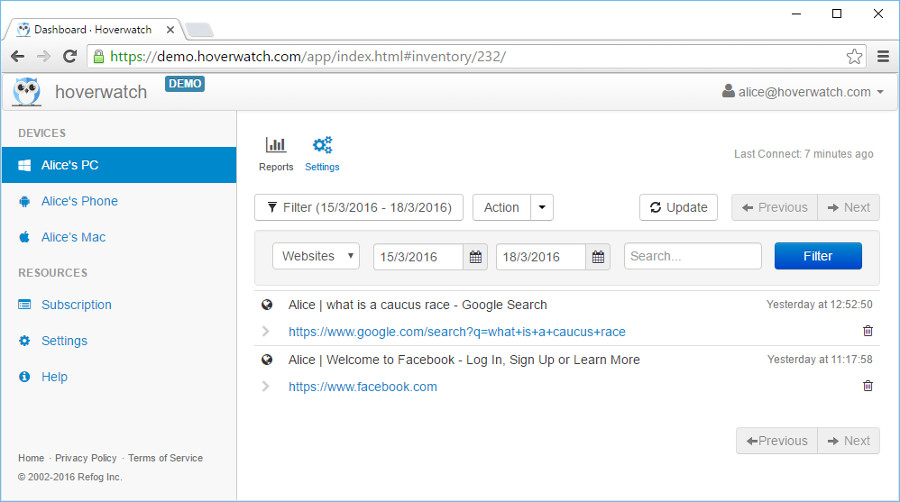 keystroke recorder for Windows Vista, 7, 8, 8.1 and 10
The list of all the websites visited on the monitored computer can be viewed online in the user panel from any device with an Internet connection.
This function of the keystroke recorder for Windows is enabled by default. You don’t have to make any adjustments to the settings for it to work.
Why is this feature useful to you?
The Internet is an essential part of everyday life for a lot of people whether it is used for work or entertainment. When using this keystroke recorder for Windows on a company-owned computer with a disclosed monitoring policy, or on your minor child's device with the child informed, you will be able to know which websites are visited by your employees and children when they are supposed to be working or doing their homework.
A lot of employees are easily distracted and can spend hours of their day interacting on social media websites, but with the help of this feature, you will know exactly when it happens. When it comes to children, they can not only play games on the Internet but also stumble upon inappropriate websites, so the importance of this feature cannot be overestimated.

